7/19/2012

BlazeVideo Video Editor Released With Large Video Editing Features


SHENZHEN, April 24, 2012 – BlazeVideo, Inc. , one of the leading multimedia software providers that specializes in DVD copy and ripper, video converter, photo and video editor, releases its new software BlazeVideo Video Editor 1.0.0, majoring to create professional videos in few clicks. Its intuitive design makes perfect video editing so easy! The following will briefly explain all the features of this new BlazeVideo Video Editor.
BlazeVideo Video Editor is a Windows-based video editing tool that works on Windows XP, Windows Vista and Windows 7.
BlazeVideo Video Editor allows you to edit and convert almost all key video formats like RM, RMVB, AVI, WMV, ASF, MPEG, MPG, M1V, MPV2, MP4, DAT, FLV, MOV, VOB,etc..
Do everything you need to create and edit perfect videos or movies with BlazeVideo Video Editor: clip, trim, crop, rotate and flip videos, apply effects in brightness, hue, saturation and contrast, insert text watermark and subtitles.
This every-one-can-use video editing software allows media experts or amateurs to enjoy amazing video and audio quality by flexibly adjusting video parameter such as video size, video bitrate, sample rate, audio bitrate. People can even preview the video effects in real time with BlazeVideo Video Editor!
Share videos or movies with friends or family by converting the edited movies to iPad, iPod, iPhone, PSP, HTC, Nokia, BlackBerry, known smart phones, etc.
BlazeVideo Video Editor - edit or create videos or movies easily

7/16/2012

How to Make an Olympic Video & Win Big Prizes


Since London 2012 Olympic Games is coming closer, BlazeVideo has released a new giveaway activity for HDTV Player Professional, Video Magic Ultimate and VideoFlick. It’s very easy to attend and win big prizes. Nobody loses this time. Here is the guide for people how to attend the giveaway activity and win big prizes.
Before reading the below tutorial, please place your focus on the basic three required rules that every competition video must meet.
  1. Your video must be edited by Video Magic or VideoFlick. (One of them must be used at least. Download Video Magic and VideoFlick directly now.)
  2. Your video title must include: BlazeVideo 2012 Olympics Giveaway + (Your video name). Example: BlazeVideo 2012 Olympics Giveaway – I Love Olympics
  3. After editing, you video must be uploaded to Youtube. And then you need to send your video link to us by marketing@blazevideo.com.
Now Follow the tutorial step by step:

STEP 1: VIDEO GATHERING OR CREATE A PERSONAL VIDEO

Since London 2012 Olympic Games is coming closer and closer, there are more and more little tidbits to appear on the internet, such as the following video. 
You can download the videos you like with Video Magic.
Or if you create your own video, you can skip this step.

STEP 2: EDIT VIDEOS

After downloading, you can edit them directly. Video Magic allows you to trim, crop, add subtitles & watermarks, etc. You can get the parts you like by cropping and edit their brightness, hue, saturation and contrast.
Note: If you only have one video to edit and upload, you can use VideoFlick directly. Although Video Magic has more editing functions, VideoFlick also supports video editing function.

STEP 3: MERGE VIDEOS INTO A SHORT MOVIE

If you have made several videos, you can merge them by using Video Magic or VideoFlick. Both of them support merging videos. When merging, you can add title and credits which will make your video more remarkable.

STEP 4: UPLOAD VIDEOS TO YOUTUBE AND SEND US LINKS

You have finished your video. Now you need to upload your videos to Youtube. You can upload your video to Youtube by using VideoFlick. Or you can have your own way. 

7/11/2012

The History of DivX and the Latest Software Players That Can Play DivX


DivX is known to create a balance between file size and quality with its very effective compression capabilities. Due to these capabilities, it becomes one of the codecs used for extracting audio and video from a source to the hard disk of the PC for archiving and transcoding copies. And many software developers released their own styles of DivX players.
The commercial DivX in competition with Microsoft video for Windows in WMV, QuickTime from Apple in the MOV and Real Video in the RMM file formats. A version of open source Xvid is released by Xvid in 2001.

THE HISTORY OF DIVX

The history of DivX should be traced back to 1998. It was a hacked version of Microsoft’s MPEG-4 version 3. Two French hackers reverse-engineered the MPEG-4 format and came up with an MPEG format encapsulated in AVI instead of ASF it originally had. After that, DVD hacking community enhanced the format, and had the DivX version 3.0. From 2002, the DivX, Inc continued to enhance the DivX software and DivX 6.6 was released in 2007.

LATEST DIVX PLAYER

DivX became widely popular for ripping copy-protected DVD materials for bootleg replication and distribution. Numbers of DVD players are claiming to play DivX materials. The most attractive of the format is that it is free and easy to use. It is versatile and can be used with both Windows and Mac computers. You can play it with many software players.
DivX Plus is the latest DivX player and it is free for Windows, while a Mac version called DivX 7. Besides, there are many other DivX players, such as Windows Media Player 11, Media Player Classic, VLC Player, Songbird, DVD X Player, etc.
Among these latest DivX players, DVD X Player 5.5 is a multifunctional media player software which can play types of media contents like VCD, SVCD, DVD, audio, videos. It also has the ability to record DVD and convert movies to iPod, iPhone, etc. There are frequently free minor updates and free technical documents available on its offical website: dvd-x-player.com.

6/28/2012

How to Make a Memorable Graduation Photo Slideshow?


If you are going to graduate from school, you must feel unwilling to part, but happy to see a glorious future. Graduation is both a hard and good time. It is hard because you have to say goodbye to your teachers, friends, also starting a new journey is good for celebrating.
At this contradictory moment, to make a memorable graduation photo slideshow and send it as gifts is a good choice to show your affections. For this purpose, you need a photo slideshow maker, like Aviosoft Video Converter, which will help you accomplish this task.
Aviosoft Video Converter Ultimate has a built-in slideshow maker, which would enable to combine photos, music, and text into slideshow and convert it into mobile formats (playable on Apple devices, HTC, BlackBerry, Nokia, Sony PSP, PS3, media players, etc). With it, you can add title, credits, background music, and transition effects to personalize the graduation photos.

GUIDE ON HOW TO MAKE GRADUATION SLIDESHOW

All you need to do is to import your photos and arrange the orders in the Slideshow window, in which you are all on your own to create a personalized graduation slideshow with 12 special effects. Following I will show you the details.

Step 1. Import Photos

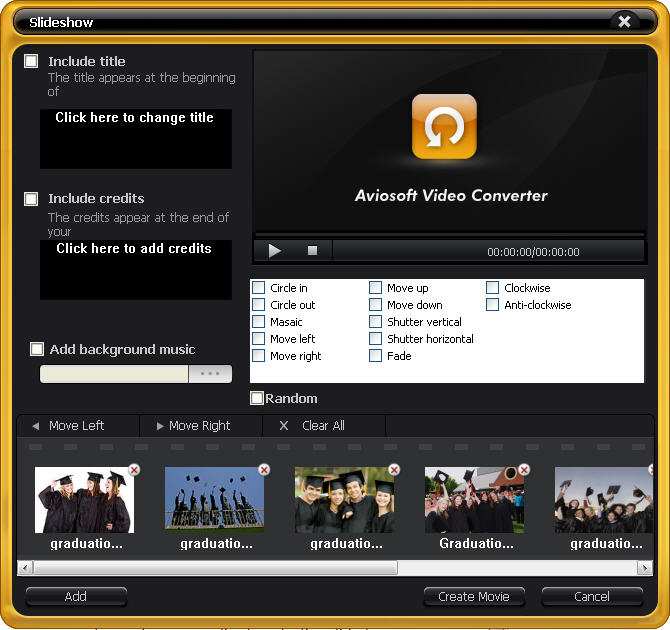
After launching the program, click the “Slideshow” button to open the sideshow making window. Click the “Add” button to import your graduation photos into it.
import graduation pics

Step 2. Add Background, Title, Credits, Effects

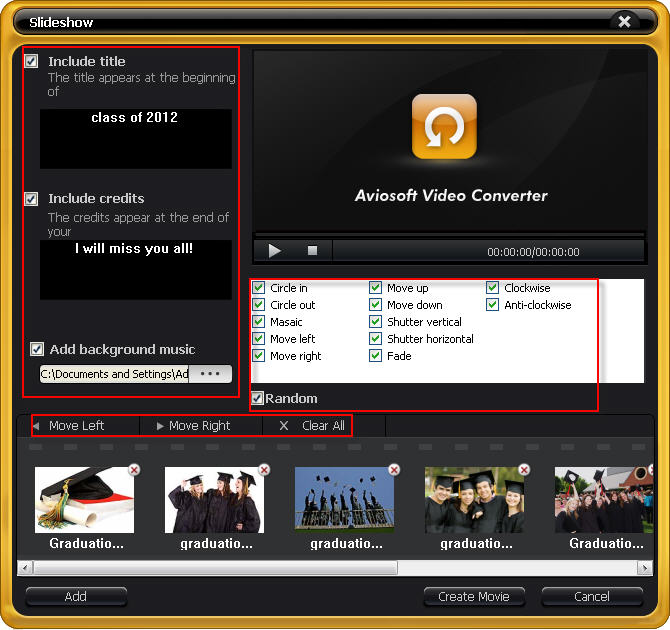
In addition, you can even add background music and subtitles to the photo slideshow to make your work much more expressive. Click the “Add background music” button to customize it. And you can include title and credits in the slideshow.
Rearrange the order of pictures by selecting the picture and moving left or right to make them well-organized. Choose one or multiple special effects to make it different.
add title music effects

Step 3. Create Slideshow & Convert

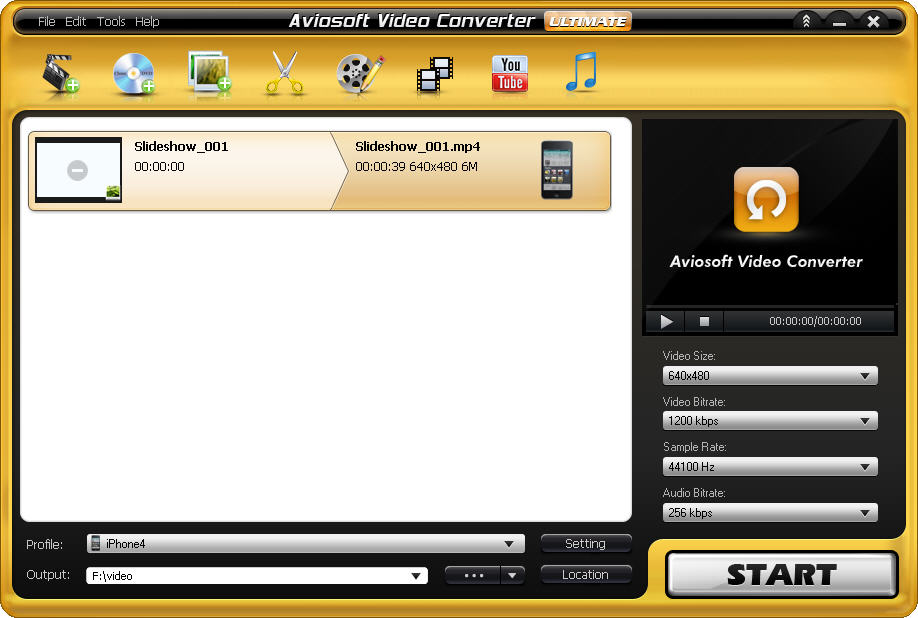
After all editing work finishes, directly “Create Slideshow” and save it as iPad / iPhone video. And you can also convert it to other format.
create slideshow

6/20/2012

How to Download Video from YouTube and Convert to Apple Devices?


Have you ever watched a video on YouTube and love so much, and want to watch it over again? With Aviosoft Video Converter, you can download YouTube video and save it on your PC.  You can even put the video that you love on portable devices for better enjoyment, such as put YouTube on remarkable Apple iPad, iPhone, iPod, etc.
Apple devices are popular and have high resolutions which are perfect for video playback. But Apple devices do not support YouTube Videos. To play YouTube videos on iDevices, you need to convert the downloaded videos to a format that supported by iDevices.   Aviosoft Video Converter can help you work all things out.

HOW TO DOWNLOAD YOUTUBE VIDEO

This YouTube downloader can quick download YouTube or Yahoo videos in minutes. With one or two simple clicks, you can get many videos downloaded straight to your PC.

Step 1. Get the YouTube Video URL

Go to YouTube, find the video you want to download, copy the URL.

Step 2. Start Downloading YouTube Video

Click youtube button to open the download box. Paste the URL in the box. Click Download button to begin downloading. Wait until the process finishes.
download youtube

CONVERT YOUTUBE TO APPLE DEVICE

With the help of the video converter itself, you can tanscode videos to files which are universal.

Step 1. Add YouTube Videos

After downloading, go back to the main interface, add YouTube files by clicking “Add file(s)” or directly drag files to the interface. Batch conversion is supported.

Step 2. Set Output Format

Browse to choose the desired device from the preset “Profile”. Here I took iPhone 4 for example.
choose output format

Step 3. Start Converting YouTube

Everything is ready. Just click “Start” to begin the YouTube to iDevice conversion.
Wait for its accomplishment. Then transfer video to your device and enjoy.

4/12/2012

Computer startup speed

When you start your computer, the computer is slow, most of the users concerned. Therefore, the common desire to speed up your computer. Summarize the process using computers, the computer starts up in a certain way, in order to speed up the sharing here.

1. the optimization settings in BIOS

The BIOS settings menu "Advanced BIOS" option, move the slider to "boot device"-Time option, and then press the button on the "top" and "Bottom", the default value is "Floppy", (d), the system reads the floppy disk drives, starting when the computer starts. Track start time and shorten your life, a floppy disk drive. So, select "drive 0. 0%, from the beginning of the hard disk drive. " In addition, you get to the BIOS settings, disable the "1MbMemoryTest" above and "QuickPowerOnSelftest".

The "Advanced chipset settings is also important to acceleration. To change the setting to "Bank 0/1 DRAM timing" a "/" or "fast" 10ns 8ns "Turbo". "Turbo" faster than the "quick", "fast but less stable," recommended.

"" "Setting is recommended for high quality memory SDRAM latency" case "2" at the beginning to ramp up.

"Many mainboards AGP support AGP, and activate the"-4XMode "."

2 DMA start, better speed, hard disk mode

UDMA/33 hard drives, technology, UDMA/66 or UDMA/100 or up to 33 MB/s transmission speed, in theory, were these disks, the speed of transmission of 66 MB/s, 100 MB/s 3-6 times than IDE disks. However, in Windows, the default settings for the DMA is disabled. If you must enable it.

Open "control panel → system → management tools" window "direction"-DJ drive, double-click the hard disk drive is UDMA, tick "settings → properties → settings" "ö" entry "DMA," go, and then click OK. "." Close all dialog boxes, and then restart the computer.

3 remove the Windows Startup logo.

First, the "start" → "settings" → "folder options" window. The "Advanced settings" labels "with regard to", select "show all files". Open the c drive, you will find this MSDOS "." and "the read-only attribute can be set aside". Open, and a statement: logo "phase 0" Option = "statement and: LOGO = 0" and then the Windows Startup logo will not load, it reduces the startup time for several seconds.

"The 4 elements" "start optimizer."

Beginners to try some computer software programs like, but deleted after a certain time. For reasons unknown, the software is always to start, which significantly increases the startup time. -Easy to solve this problem. "Start" → "Run" and type in order to increase the "Msconfig" command programs "system configuration utility", click the "start" tab and "ö" delete all programs, it can not be downloaded. At least you can boot in 10 seconds.

4/05/2012

Apple iPhone and iPad game controller work?


A number of third parties on the market for iOS game controllers, but now the rumours on Apple the first physical domain controller. A review of the most recent entries from the iPad 's-śAnandTech (3rd generation), which argued that the works of the gadgets.

"I know that a project on the control of Apple's physical, but never will see, if you continue to see", he said."Smartphones, tablets and thin entry to the current game consoles, performance, I think you should add the controller to issue attack."

The Sony Android Xperia play problem, development of touch-screen phone with control box. As the mobile industry is a so much rapid progress at the top of the food chain, but it is not. The players were flocking to the device, if not a debut, and on the basis of the amount of touch input, and a usually pretty comfortable. Google also has a kitchen and wireless support wireless gamepad for Google 3.0 "HONEYCOMB", and later.

The review noted a FPS than the combined keyboard and mouse are much higher, but the focus of the developers to configure the console controller (PS3). But over the past ten years, so secure, it is said that even with the touch-based controls to happen, maybe it has improved the method entry. His two touch pad that we go to achieve perfection in a long way, but in both cases it is certainly playable games (touch vs. the command box) show the Xperia play.

But now, it seems, the Android front controller and a third party Google support. Believes that the pressure on Apple? Maybe because Google and Apple accounts for 58% of the sales of games software, the end of 2011.Apple is, not just Google, or competitive fight for Nintendo, Microsoft and Sony one today. Against the big three to 4 Q 12-based site for the Nintendo Wii console is the biggest threat to the affected table.

Continue on its own, if the third party is doing an excellent job with Apple's game-development of your own?Probably would move to the official Apple device, but it appears that Apple is already a domain controller now cough if he had thought that the device was really necessary. Of course, this is only an opinion.


2/20/2012

What are the nexus took Samsung Galaxy of video formats supported

Samsung Galaxy nexus is the first mobile phone come loaded with Android 4.0 ice cream sandwich - a version that could serve as a new platform, given his full review. It was released in October 2011. It is equipped with a touch screen capacitive Super AMOLED of 4.65 inches with a resolution of 720 x 1280 pixels. 1.2 GHz dual-core cortex-A9 processor but fast, 5 0MP, 2592 x 1944 pixels camera back touch focus, geo tagging, face detection. Samsung Galaxy nexus supports 1080p HD video playback.

Because it can take HD 1080p video, we take a look at what the Samsung Galaxy formats supported are nexus.

By Galaxy nexus supported formats:

-Video formats: MP4, h. 264, h. 263, and

Audio formats: MP3, WAV, eAAC +, AC3

You want your DVD or your collection of videos on this link to play high-performance Samsung Galaxy? Because it has no DVD drive, not the link of the Galaxy DVD movies can play directly. The best way to get DVD movies on DVD to video format Galaxy convert nexus. And not all video formats support it, so that you have videos in other formats in the format convert supports Samsung Galaxy. The best DVD / Galaxy nexus converter help video convert DVD / video to Samsung Galaxy nexus with the best quality of reading and fast speed.

Required software: Aviosoft-video-converter

Aviosoft video converter is all-in one video converter, which converts all video formats, including DVD movies and HD videos. Almost all popular brands of portable devices are, etc. supported for the new preset, such as Apple, BlackBerry, Sony, Samsung, HTC, Nokia.

Step by step guide:

Step 1 download and install the converter.

Step 2 click "Open DVD" DVD can import into the program the DVD or DVD folder, IFO files download. Or, click on "Add file" videos to load.

Step 3 select the output format in the "Profile" menu. Here I suggest ' HD-video - > MP4 "

Step 4 click on the button "Settings" for Galaxy nexus with better quality of reading the parameters set.

Advice - set resolution 1280 ** 720 fps to 30 frames per second and bit rate 15000kbps.


Step 5 start the DVD / video to transform of the Galaxy nexus by clicking on the "Start" button.
========================================

2/17/2012

Free Gift on Valentine’s Day


Valentine’s celebrations are in the air. Everyone is getting struck with enhancing feeling of love. Right now, every merchant or organization is up with Valentine’s celebration and you can find great discounts on clothing, shoes, cosmetics, food, or free gifts etc. This morning in the subway, I received a newspaper and an orange from a volunteer of the newspaper office that make a cheerful morning.
As a leading multimedia solution provider, Aviosoft also has not been able to resist the celebration of love. Among their special offers, free iPad Video Converter is available in February, 2012.
The main features of Aviosoft iPad Video Converter:
-          Convert almost all popular video formats such as HD, AVI, MPEG, WMV, DivX, MP4, MOV, RM, RMVB, ASF, 3GP etc. to MP4 for iPad.
-          Edit video for iPad. Clip, crop, merge, and add watermark and subtitles.

 -                   -             Download video for iPad. Download and save any video from YouTube and Yahoo.

-          Create photo slideshow for iPad.

With this FREE iPad Video converter, you can enjoy movies on iPad easily. How to get this FREE iPad Video Converter? It is very simple! Leave any message by your Facebook, Yahoo, AOL or Hotmail accounts, and you will get our Aviosoft iPad Video Converter  license for FREE instantly! Come on to get this valuable iPad Video Converter (original $29.95) totally free!


=======================